winMain부터 살펴보자
int WINAPI WinMain(HINSTANCE hInstance, HINSTANCE prevInstance,
				   PSTR cmdLine, int showCmd)
{
try
    {
        InitDirect3DApp theApp(hInstance);  // instance 받아서
        if(!theApp.Initialize())  // 초기화 시도
            return 0;

        return theApp.Run();
    }
    catch(DxException& e)  // 이거는 ZNUtils에서 exception 대체
    {
        MessageBox(nullptr, e.ToString().c_str(), L"HR Failed", MB_OK);
        return 0;
    }
}
받아온 hInstance로 app생성 ⇒ theApp
initialize 부분 코드는 if로 체크해서 실패할 경우 다 대응하는 식으로 코드가 쓰여있음
!theApp.Initialize()라면
[ InitDirectCode ]
bool D3DApp::InitDirect3D()
{
#if defined(debug) || defined(_debug)
	// enable the d3d12 debug layer.
{
	comptr<id3d12debug> debugcontroller;
	throwiffailed(d3d12getdebuginterface(iid_ppv_args(&debugcontroller)));
	debugcontroller->enabledebuglayer();
}
#endif

	ThrowIfFailed(CreateDXGIFactory1(IID_PPV_ARGS(&mdxgiFactory)));

	// Try to create hardware device.
	HRESULT hardwareResult = D3D12CreateDevice(      // part 1 create device
		nullptr,             // default adapter
		D3D_FEATURE_LEVEL_11_0,
		IID_PPV_ARGS(&md3dDevice));

	// Fallback to WARP device.
	if(FAILED(hardwareResult))                      // part 2
	{
		ComPtr<IDXGIAdapter> pWarpAdapter;
		ThrowIfFailed(mdxgiFactory->EnumWarpAdapter(IID_PPV_ARGS(&pWarpAdapter)));

		ThrowIfFailed(D3D12CreateDevice(
			pWarpAdapter.Get(),
			D3D_FEATURE_LEVEL_11_0,
			IID_PPV_ARGS(&md3dDevice)));
	}

	ThrowIfFailed(md3dDevice->CreateFence(0, D3D12_FENCE_FLAG_NONE,
		IID_PPV_ARGS(&mFence)));

	mRtvDescriptorSize = md3dDevice->GetDescriptorHandleIncrementSize(D3D12_DESCRIPTOR_HEAP_TYPE_RTV);
	mDsvDescriptorSize = md3dDevice->GetDescriptorHandleIncrementSize(D3D12_DESCRIPTOR_HEAP_TYPE_DSV);
	mCbvSrvUavDescriptorSize = md3dDevice->GetDescriptorHandleIncrementSize(D3D12_DESCRIPTOR_HEAP_TYPE_CBV_SRV_UAV);

    // Check 4X MSAA quality support for our back buffer format.
    // All Direct3D 11 capable devices support 4X MSAA for all render
    // target formats, so we only need to check quality support.

	D3D12_FEATURE_DATA_MULTISAMPLE_QUALITY_LEVELS msQualityLevels;
	msQualityLevels.Format = mBackBufferFormat;
	msQualityLevels.SampleCount = 4;
	msQualityLevels.Flags = D3D12_MULTISAMPLE_QUALITY_LEVELS_FLAG_NONE;
	msQualityLevels.NumQualityLevels = 0;
	ThrowIfFailed(md3dDevice->CheckFeatureSupport(
		D3D12_FEATURE_MULTISAMPLE_QUALITY_LEVELS,
		&msQualityLevels,
		sizeof(msQualityLevels)));

    m4xMsaaQuality = msQualityLevels.NumQualityLevels;
	assert(m4xMsaaQuality > 0 && "Unexpected MSAA quality level.");

#ifdef _DEBUG
    LogAdapters();
#endif

	CreateCommandObjects();
    CreateSwapChain();
    CreateRtvAndDsvDescriptorHeaps();

	return true;
}
HRESULT
DXGI
command list
Microsoft::WRL::ComPtr<ID3D12GraphicsCommandList> commandList;
커맨드리스트는 여러 메소드를 가지고 있고, 아래 코드처럼 메소드로 추가하면 커맨드리스트에 기록이 되고 commandQueue→executeCommand(개수, 커맨드리스트들) 로 그동안 만들어둔 커맨드리스트가 커맨드큐에 제출된다.
// initDirect3DApp.cpp

void InitDirect3DApp::Draw(const GameTimer& gt)
{
    // Reuse the memory associated with command recording.
    // We can only reset when the associated command lists have finished execution on the GPU.
	ThrowIfFailed(mDirectCmdListAlloc->Reset());

	// A command list can be reset after it has been added to the command queue via ExecuteCommandList.
    // Reusing the command list reuses memory.
    ThrowIfFailed(mCommandList->Reset(mDirectCmdListAlloc.Get(), nullptr));

	// Indicate a state transition on the resource usage.
	mCommandList->ResourceBarrier(1, &CD3DX12_RESOURCE_BARRIER::Transition(CurrentBackBuffer(),
		D3D12_RESOURCE_STATE_PRESENT, D3D12_RESOURCE_STATE_RENDER_TARGET));

    // Set the viewport and scissor rect.  This needs to be reset whenever the command list is reset.
    mCommandList->RSSetViewports(1, &mScreenViewport);
    mCommandList->RSSetScissorRects(1, &mScissorRect);

    // Clear the back buffer and depth buffer.
	mCommandList->ClearRenderTargetView(CurrentBackBufferView(), Colors::LightSteelBlue, 0, nullptr);
	mCommandList->ClearDepthStencilView(DepthStencilView(), D3D12_CLEAR_FLAG_DEPTH | D3D12_CLEAR_FLAG_STENCIL, 1.0f, 0, 0, nullptr);

    // Specify the buffers we are going to render to.
	mCommandList->OMSetRenderTargets(1, &CurrentBackBufferView(), true, &DepthStencilView());

    // Indicate a state transition on the resource usage.
	mCommandList->ResourceBarrier(1, &CD3DX12_RESOURCE_BARRIER::Transition(CurrentBackBuffer(),
		D3D12_RESOURCE_STATE_RENDER_TARGET, D3D12_RESOURCE_STATE_PRESENT));

    // Done recording commands.
	ThrowIfFailed(mCommandList->Close());                                  // 다 추가 했으면 close로 닫아주고

    // Add the command list to the queue for execution.
	ID3D12CommandList* cmdsLists[] = { mCommandList.Get() };               // 리스트 뽑아와서
	mCommandQueue->ExecuteCommandLists(_countof(cmdsLists), cmdsLists);    // 여기서 실제로 커맨드큐에 추가됨

	// swap the back and front buffers
	ThrowIfFailed(mSwapChain->Present(0, 0));
	mCurrBackBuffer = (mCurrBackBuffer + 1) % SwapChainBufferCount;

	// Wait until frame commands are complete.  This waiting is inefficient and is
	// done for simplicity.  Later we will show how to organize our rendering code
	// so we do not have to wait per frame.
	FlushCommandQueue();
}
allocator
코드를 보면 allocator를 reset하고 commands를 allocator의 메모리에 저장한다. 라는데 잘 모르겠다
타입 지정하고, 상세 설정이나 실제로 만들고 하는거는 d3dApp.cpp의 CreateCommandObejcts() 인 것 같다
void D3DApp::CreateCommandObjects()
{
	D3D12_COMMAND_QUEUE_DESC queueDesc = {};
	queueDesc.Type = D3D12_COMMAND_LIST_TYPE_DIRECT;
	queueDesc.Flags = D3D12_COMMAND_QUEUE_FLAG_NONE;
	ThrowIfFailed(md3dDevice->CreateCommandQueue(&queueDesc, IID_PPV_ARGS(&mCommandQueue)));

	ThrowIfFailed(md3dDevice->CreateCommandAllocator(
		D3D12_COMMAND_LIST_TYPE_DIRECT,
		IID_PPV_ARGS(mDirectCmdListAlloc.GetAddressOf())));

	ThrowIfFailed(md3dDevice->CreateCommandList(
		0,    // 그래픽카드가 하나인 시스템 : 0
		D3D12_COMMAND_LIST_TYPE_DIRECT,
		mDirectCmdListAlloc.Get(), // Associated command allocator
		nullptr,                   // Initial PipelineStateObject
		IID_PPV_ARGS(mCommandList.GetAddressOf())));

	// Start off in a closed state.  This is because the first time we refer
	// to the command list we will Reset it, and it needs to be closed before
	// calling Reset.
	mCommandList->Close();
}
한 할당자에 command list 여러개 연관시킬 수 있는데, command 를 command list에 기록하는 행위 자체는 동시에 일어날 수 없음. 즉, coomand list 가 여러개 있어도 다른애가 command 작성중이면 그 외의 모든 command list는 닫혀 있어야함.
왜냐하면, 그래야 한 command list내의 모든 command가 할당자 내에서 인접해서 저장된다.
execute 하고 나면 Allocator를 Reset()한다.
CPU/GPU 동기화
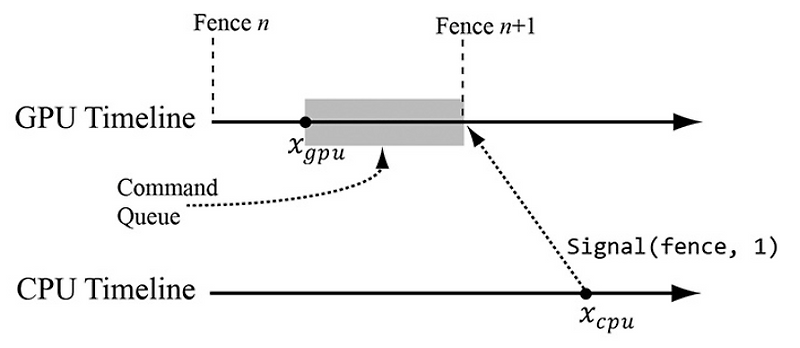
동기화를 위해 coommand queue의 특정 지점까지 명령을 처리할때까지 기다리고 (특정 지점까지 명령 처리 → 명령 대기열 비운다 → flush) fence를 사용한다.
fence
void D3DApp::FlushCommandQueue()
{
	// Advance the fence value to mark commands up to this fence point.
    mCurrentFence++;

    // Add an instruction to the command queue to set a new fence point.  Because we
	// are on the GPU timeline, the new fence point won't be set until the GPU finishes
	// processing all the commands prior to this Signal().
    ThrowIfFailed(mCommandQueue->Signal(mFence.Get(), mCurrentFence));

	// Wait until the GPU has completed commands up to this fence point.
  //
    if(mFence->GetCompletedValue() < mCurrentFence) // 새로운 fence 값 전까지는 n값을 돌려줌
	{
		HANDLE eventHandle = CreateEventEx(nullptr, false, false, EVENT_ALL_ACCESS);

        // Fire event when GPU hits current fence.
        ThrowIfFailed(mFence->SetEventOnCompletion(mCurrentFence, eventHandle));

        // Wait until the GPU hits current fence event is fired.
		WaitForSingleObject(eventHandle, INFINITE);
        CloseHandle(eventHandle);
	}
}
CPU가 ID3D12CommandQueue::Signal(fence, n+1)을 호출한 직후
CPU가 ID3D12CommandQueue::Signal(fence, n+1)을 호출한 직후